![Logo_white-without-background (1).png]](https://help.primetag.com/hs-fs/hubfs/Logo_white-without-background%20(1).png?height=40&name=Logo_white-without-background%20(1).png)
Below, you’ll find different use cases that highlight how Content Explorer can enhance your search and discovery efforts within Primetag.
1. Advanced Influencer Discovery based on categories
Content Explorer is the perfect tool for conducting qualitative influencer searches. By using keywords and filters, you can identify influencers who produce content that fits your campaign needs.
Example: Let’s say you’re a beauty brand launching a new serum for acne-prone skin. You want to collaborate with influencers who focus on skincare or acne-related topics. Here’s how to find them:
- Go to the "Text or Hashtag" filter in Content Explorer.
- Type relevant keywords like "acne", "skincare" or "oily skin".
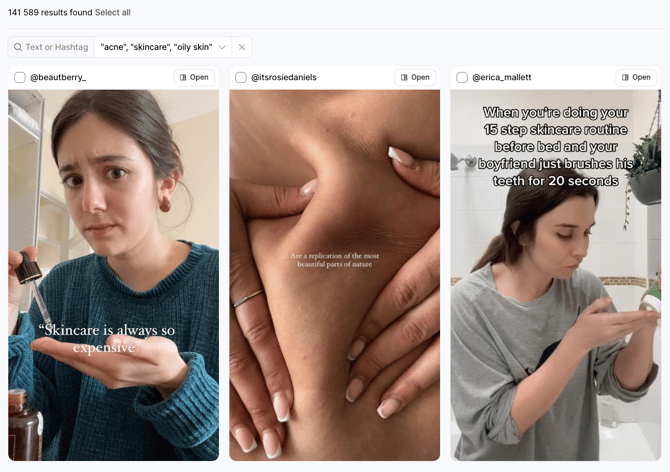
Content Explorer will then display posts from influencers containing at least one of these keywords. You can further refine your search by:
- Setting a minimum engagement rate.
- Filtering by follower count.
- Searching for specific content formats, such as reels.
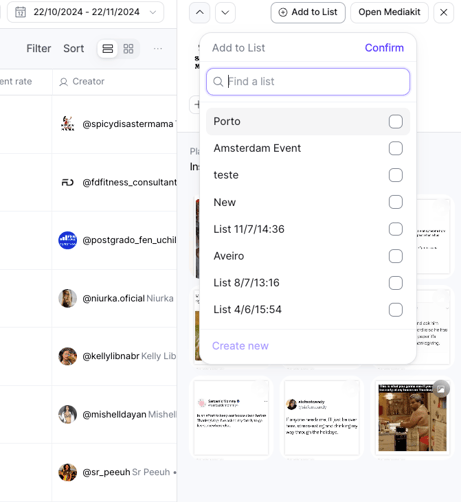
Once you’ve applied your filters, review the influencers' profiles, media kits, and metrics to ensure they align with your goals. Finally, add the ones of your choice to an existing List or create a new one:
2. Advanced Influencer Evaluation: Assess Relevance and Resonance
Selecting the right influencer goes beyond metrics. It’s important to evaluate both resonance and relevance to determine how well an influencer fits your brand.
- Relevance: Gauge how often an influencer discusses topics related to your brand's niche. If an influencer posts frequently about the keywords you’ve searched for, it’s likely their audience is familiar with the subject.
- Resonance: Analyze engagement rates specific to the content related to your brand's niche. For example, a makeup brand should focus on engagement rates for beauty content, rather than the influencer’s overall engagement.
How to do it:
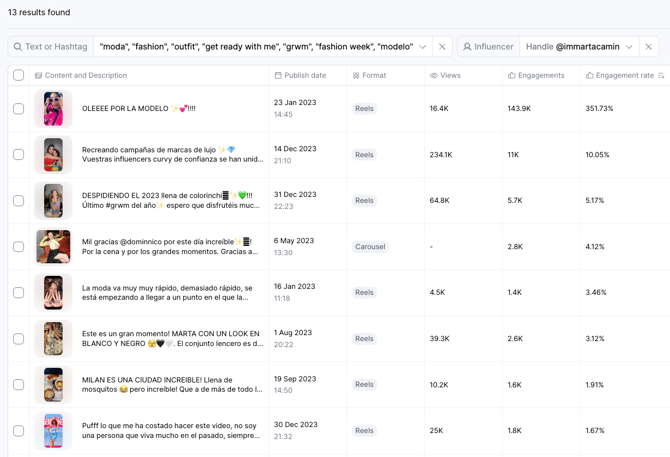
- Search for the influencer’s handle in Content Explorer.
- Apply relevant keywords and download an Excel report of their posts.
- Analyze the engagement rates for specific topics and compare them to the influencer's general engagement.
3. Benchmarking: Track Competitors' Influencer Strategies
Content Explorer enables you to monitor your competitors’ influencer strategies, helping you identify key trends and opportunities.
Example: If you’re in the fashion industry, you can use the "Brand Mention" filter to analyze how influencers engage with brands like Zara or H&M.
- Choose a social platform and time range (e.g., the past 30 days).
- Review the results showing influencers with over 10K followers mentioning these brands.
Export the data into an Excel file to get insights into:
- The number of mentions and influencers for each brand.
- The breakdown between posts and stories.
- Estimated reach, impressions, engagement rate, and media value.
Additional analysis ideas:
- Explore the top 50 brand mentions in your sector.
- Compare the performance of different influencers over time to spot trends.
- Use the "Sponsored only" filter and find how many pieces of content were paid and compare them to the organic ones within the same period of time.
4. Content Clipping: Track Branded Content
Content Explorer is a valuable resource for tracking campaign content, especially when working with multiple influencers. However, Content Explorer provides only publicly available and estimated performance data. For more accurate reporting—particularly for paid campaigns or annual reporting—we strongly recommend using the Campaign section instead.
With this in mind, if you plan to use Content Explorer to track content from an upcoming campaign, we recommend filtering by the influencers’ usernames before the activation (using the Handle option under Creator Filters). This ensures they are already part of the Content Explorer database and prevents any content from being missed (especially Stories) once the campaign goes live.
Steps after publication:
- Select your campaign date range and platform.
- Enter influencer handles and relevant brand mentions.
- Include any campaign-specific hashtags.
You can then export a report in PDF or Excel format for easy analysis. Alternatively, you can create a bucket to save all the content you need for future reference.
Keep in mind that Content Explorer is based on publicly available data. Primetag gathers and displays public metrics, such as engagements, engagement rates, and Reels plays, in the software and your exports. However, it cannot access private insights like reach. For private metrics, Primetag provides estimates based on real data from the Campaigns section, where influencers actively register and connect their social media accounts.
If you need further details about this topic or have any additional questions, don't hesitate to reach out to our Support team at support@primetag.com. We're here to help!