---
title: How Primetag measures Online Sales
description: Learn how Primetag measures online sales from influencer campaigns using cookieless ID matching. Discover how Prime links, creator interactions, and e-commerce integrations work together to attribute first-click, assisted, and last-click sales while remaining privacy compliant.
---
[Skip to content](https://help.primetag.com/knowledge/how-primetag-measures-online-sales#main-content)
![Logo\_white-without-background (1).png\]](https://help.primetag.com/hs-fs/hubfs/Logo_white-without-background%20(1).png?height=40&name=Logo_white-without-background%20(1).png)
Open main navigation
Close main navigation
- [Go to primetag.com](https://primetag.com/)
[Go to primetag.com](https://primetag.com/)
How can we help you?
- There are no suggestions because the search field is empty.
1. [Knowledge Base](https://help.primetag.com/knowledge?hsLang=en)
2. [Tracking & Reporting](https://help.primetag.com/knowledge/tracking-reporting?hsLang=en)
3. [Technical Integrations](https://help.primetag.com/knowledge/tracking-reporting?hsLang=en#technical-integrations)
# How Primetag measures Online Sales
## One of the hardest questions in influencer marketing is also one of the most technically complex: did this campaign actually drive sales?
Brands invest across multiple channels to bring shoppers to their store. Creators build awareness and drive traffic but their contribution to revenue is rarely visible in standard reporting tools, which only capture **“last-click sales”, which typically represent just 10–15% of total sales** generated across a customer journey where creators played a role.
Built independently of cookies and social media walled gardens, Primetag answers this question by connecting two sides:
- the creator activity happening **on social media**
- and the purchases happening **on your e-commerce store**
When a shopper is impacted by a creator in your campaign and goes on to buy, Primetag measures that — and attributes it to the corresponding creator.
Four entities are involved in this process:
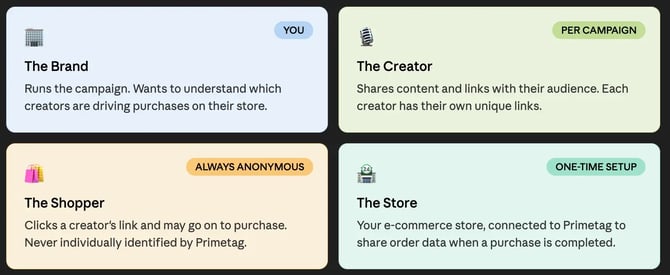
These 4 entities form a loop:
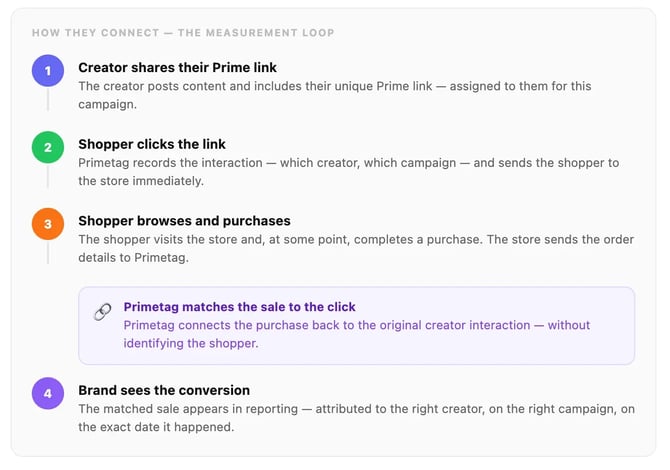
The sections below explain each step, starting with how links are set up and assigned.
> [1. Campaign links](https://help.primetag.com/knowledge/how-primetag-measures-online-sales#campaign-links)
>
> [2. How tracking works](https://help.primetag.com/knowledge/how-primetag-measures-online-sales#how-tracking-works)
>
> [2.1. ID Matching](https://help.primetag.com/knowledge/how-primetag-measures-online-sales#ID-matching)
>
> [3. What Primetag collects](https://help.primetag.com/knowledge/how-primetag-measures-online-sales#what-primetag-collects)
>
> [4. Attribution & Reporting](https://help.primetag.com/knowledge/how-primetag-measures-online-sales#attribution-reporting)
>
> [5. Privacy & Compliance](https://help.primetag.com/knowledge/how-primetag-measures-online-sales#privacy-compliance)
>
> [6. FAQ](https://help.primetag.com/knowledge/how-primetag-measures-online-sales#FAQ)
### Campaign links
To track online sales through Primetag, [it starts with links](https://help.primetag.com/knowledge/tracking-campaign-clicks-with-primetag?hsLang=en). Inside your campaign, you add the destination URLs you want to drive traffic to — the product pages or landing pages relevant to that campaign.
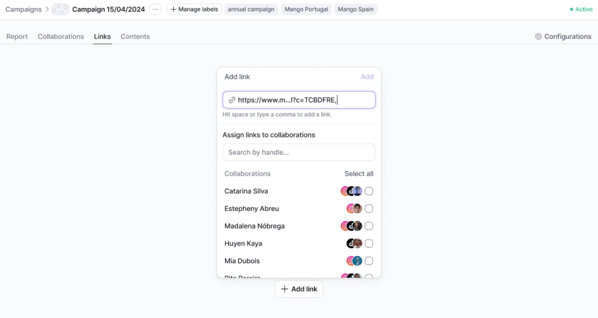Once you assign a destination link to a creator, Primetag automatically generates a unique Prime link for that combination of creator and destination. This is the link the creator shares in their content.
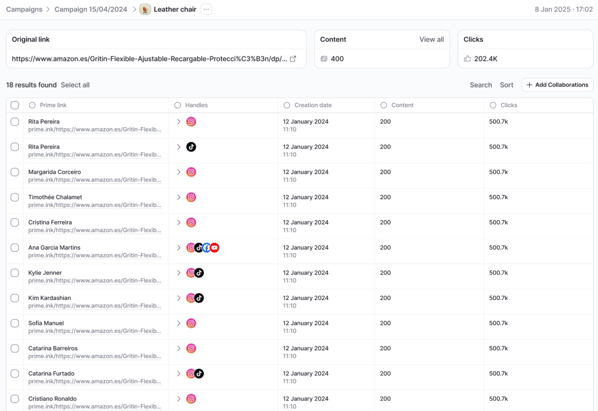
Every click on a Prime link is recorded and tied to the creator it was assigned to — giving you **individual visibility on traffic and, when a purchase follows, on sales.**
Prime Links simply redirect to your link. If your destination links have UTMs, your tracking is never lost.
Clicks are tracked from the moment a Prime link is created, regardless of whether they happen before the campaign's official start date or after it ends.
Each Prime link is unique to one creator. Links should not be shared between creators, as this would prevent accurate attribution at the individual level.
### How tracking works
When a creator shares their link and a shopper clicks it, Primetag records that interaction, from which campaign, and through which creator. The shopper is then taken to your store immediately, with no perceptible delay.
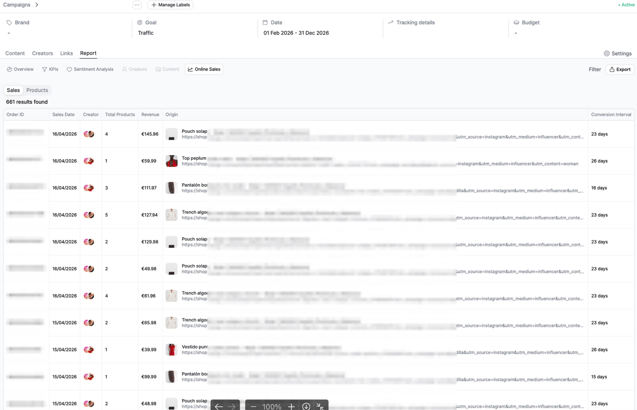
**When a purchase is completed on your store, the order details are sent to Primetag**. Our system then determines whether that purchase can be connected to a prior campaign interaction.

Sending purchase data to Primetag requires a one-time integration with your e-commerce store. [Find here](https://help.primetag.com/knowledge/set-up-your-e-commerce-integration-to-track-online-sales?hsLang=en) the official guidelines to complete this process.
### ID Matching
When a shopper clicks a Prime link, Primetag collects non-personally identifiable information from their device and browsing environment. **This data is anonymized** and used to create a unique ID from that interaction.
When a purchase is completed on your store, **Primetag matches that order to the corresponding ID** — connecting the sale back to the creator interaction that preceded it.
This matching is cookieless, which means it works across environments where cookie-based tracking cannot — including social media. As a result, Primetag captures a fuller picture of the creator's role in the customer journey: not just last-click sales, but also assisted sales and first-click sales.
- *First-click sale* means the creator was the starting point of the customer journey
- *Assisted* *sale* means the creator played a role at some point along the way
- *Last-click sale* means the creator was the final touchpoint before purchase
The specific methodology behind ID matching is part of Primetag's intellectual property and cannot be disclosed.
### What Primetag collects
Primetag collects the minimum Non-Personally Identifiable Information (NPII) necessary to connect a campaign interaction to a purchase. No more.
- **At the click** — Primetag records that an interaction happened, and which creator and campaign it belongs to. No personal data about the shopper is collected or stored.
- **At the purchase** — Your store sends Primetag the order value, order ID, and products sold. This is the data you explicitly configure as part of the integration setup.
Primetag does not build shopper profiles, track behaviour across other websites, or retain data beyond what is required to perform the match within your account.
### Attribution & reporting
Primetag is focused on one question: did a shopper interact with a creator in your campaign before making a purchase? We do not attempt to measure or compete with other channels in your marketing mix — our role is to make the creator's contribution visible, so that you can decide the attribution and weight of this channel.
When a purchase is matched to a campaign interaction, **Primetag records the exact date of that conversion and the interval between the click and the purchase**. Even though we track and store all matched sales, you can setup your attribution window according to your needs.
Because Primetag is designed to capture interactions that other analytics tools may not see — particularly those originating on social media — **creator attributed sales figures may be higher than those shown in platforms like Google Analytics**. This is expected: it reflects the creator's role in the customer journey, which is often invisible to tools that rely on cookie and session-based matching techniques that social media platforms like Meta do not support.
### Privacy & compliance
Primetag's approach to data collection is designed to be compatible with GDPR and applicable privacy regulations.
- **Minimal collection** — We collect only what is necessary to attribute a purchase to a campaign interaction. No browsing history, personal profiles, or cross-site tracking.
- **No identification** — Primetag does not identify individual shoppers. Matching is performed using Non-Personally Identifiable Information (NPII). Primetag does not store or process data in a way that directly identifies individual shoppers.
- **Account-scoped data** — All data is scoped to your Primetag account and is never shared with or visible to other clients or third parties.
- **Data retention & deletion**: Data collected through online sales tracking is retained for the duration of the contractual relationship and can be deleted at any time, upon request.
### FAQ
**Why might Primetag show more attributed sales than Google Analytics?**
Creator attributed sales figures may be higher than those shown in platforms like Google Analytics. This is expected: it reflects the creator's role in the customer journey, which is often invisible to measurement tools that rely on cookie and session-based matching techniques that social media platforms like Meta do not support.
**What is a Prime link and why does every creator need their own?**
Once you assign a destination link to a creator, Primetag automatically generates a unique Prime link for that combination of creator and destination. Each Prime link is unique to one creator. Links should not be shared between creators, as this would prevent accurate attribution at the individual level.
**What happens to clicks before or after the campaign dates?**
Clicks are tracked from the moment a Prime link is created. We track all clicks but for reporting purposes, we only share the results within the timeframe of the campaign.
**Does Primetag use cookies?**
Primetag's ID matching is cookieless, which means it works across environments where cookie-based tracking cannot — including social media.
**What attribution window does Primetag apply?**
All matched conversions are reported with their corresponding conversion interval. You then apply the attribution window that makes sense for your analysis: 1 day, 7 days, 30 days, 90 days, or beyond.
**What data does Primetag collect about shoppers?**
Primetag collects the minimum non-personally identifiable information necessary to connect a campaign interaction to a purchase. At the click, Primetag records that an interaction happened, and which creator and campaign it belongs to. At the purchase, your store sends Primetag the order value, order ID, and products sold — the data you explicitly configure as part of the integration setup.
If you need further details about this topic or have any additional questions, don't hesitate to reach out to our Support team at **support@primetag.com**. We're here to help!
- [Primetag Basics](https://help.primetag.com/knowledge/primetag-basics?hsLang=en)
- [Discovery & Evaluation](https://help.primetag.com/knowledge/discovery-evaluation?hsLang=en#main-content)
- [Discover](https://help.primetag.com/knowledge/discovery-evaluation?hsLang=en#discover)
- [Search by Handle](https://help.primetag.com/knowledge/discovery-evaluation?hsLang=en#search-by-handle)
- [Content Explorer](https://help.primetag.com/knowledge/discovery-evaluation?hsLang=en#content-explorer)
- [Audience Overlap](https://help.primetag.com/knowledge/discovery-evaluation?hsLang=en#audience-overlap)
- [Tracking & Reporting](https://help.primetag.com/knowledge/tracking-reporting?hsLang=en#main-content)
- [Create your campaign](https://help.primetag.com/knowledge/tracking-reporting?hsLang=en#create-your-campaign)
- [Analyze the results](https://help.primetag.com/knowledge/tracking-reporting?hsLang=en#analyze-the-results)
- [Technical Integrations](https://help.primetag.com/knowledge/tracking-reporting?hsLang=en#technical-integrations)
- [Primetag's AI agent: Universe](https://help.primetag.com/knowledge/primetags-ai-agent-universe?hsLang=en#main-content)
- [Universe Basics](https://help.primetag.com/knowledge/primetags-ai-agent-universe?hsLang=en#universe-basics)
- [Universe for Brands](https://help.primetag.com/knowledge/primetags-ai-agent-universe?hsLang=en#universe-for-brands)
- [Universe for Agencies](https://help.primetag.com/knowledge/primetags-ai-agent-universe?hsLang=en#universe-for-agencies)
- [Universe for Talent Agencies](https://help.primetag.com/knowledge/primetags-ai-agent-universe?hsLang=en#universe-for-talent-agencies)
- [Primetag for creators](https://help.primetag.com/knowledge/primetag-for-creators?hsLang=en)
[%20(1).png?width=119&height=24&name=Logomark%20(1)%20(1).png "Chill listening crop-3")](http://www.primetag.net)
Copyright © 2025, Primetag