![Logo_white-without-background (1).png]](https://help.primetag.com/hs-fs/hubfs/Logo_white-without-background%20(1).png?height=40&name=Logo_white-without-background%20(1).png)
Once your campaign has finished, navigate to the Report tab to gain a complete understanding of its performance. This section is divided into three main views: Overview, KPIs, and Sentiment.
Overview Section
-
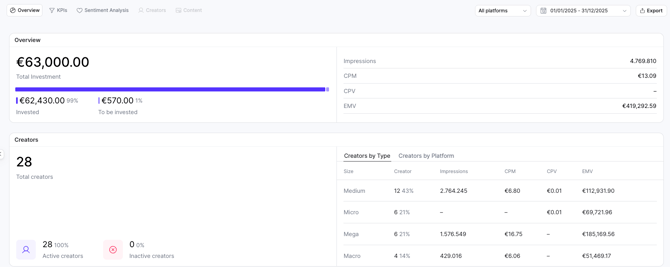
Overview: Displays the budget allocation (Total Budget vs. Total Invested, based on fees assigned per collaboration) and the main KPIs tied to your campaign objective. You can update your main campaign goal in Settings at any time to prioritize different KPIs in this view.
-
Creators: Shows the ratio of active vs. inactive creators within the campaign—especially useful for events, seeding, or organic activations. It also includes tables categorizing creators' performance by type (based on follower count) and by platform.
-
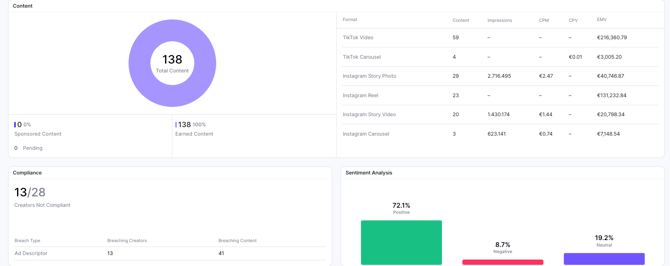
Content: Provides a breakdown of Sponsored Content (based on publishing terms within each collaboration if any) vs. Earned Content (content published within the campaign). A table showing content performance divided by formats is also included.
-
Compliance & Sentiment: Summary insights, available if these modules are included in your subscription.
KPIs Section
A funnel-based view of overall campaign performance:
-
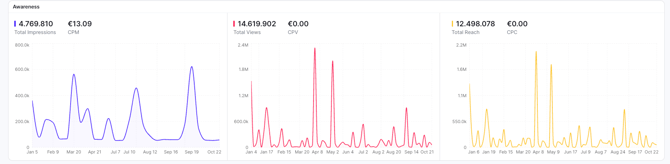
Awareness: Insights related to reach, impressions, and views—showing how many people were impacted and key cost metrics including cost per contact, cost per view, and CPM.
-
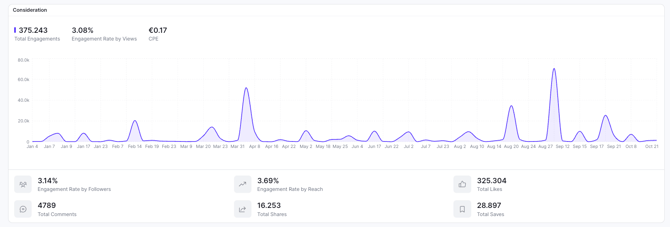
Consideration: Engagement metrics, including total interactions, interaction types, average Engagement Rate (ER), and cost per engagement.
-
Clicks: Total clicks generated and average cost per click.
Sentiment Analysis Section
This view applies the same sentiment methodology used at the individual content and collaboration level, but across all comments from in-feed posts within the campaign. Top posts and collaborations with the most positive and negative sentiment are also highlighted.
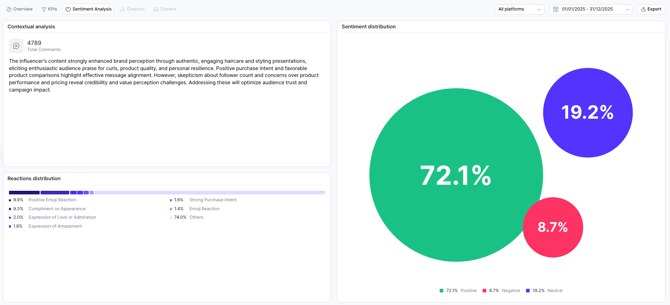

Finally, you can export all campaign data in PDF or Excel format. For long-term campaigns, use the available filters to adjust data by platform and date range to extract the most relevant results.
If you have any questions or need further assistance, feel free to contact our Support team at support@primetag.com. We’re here to help!